European Accessibility Act & Video Games: Going Over The Facts (June 2025)
10 June 2025
Understanding when and how gaming products fall under regional accessibility laws can be a daunting task. Let’s dive into what we currently know about how EAA requirements apply to the video games industry. We will continue to update this page as we learn more.
Disclaimer: Just at the outset, we would like to flag this article has been prepared to provide guidance on the EAA by industry professionals. It is not a legal article or legal advice and so as you navigate EAA requirements, we recommend that you seek specific legal advice as needed.
First things first, what is the EAA?
EAA stands for ‘’European Accessibility Act’’ and it is a directive from the European Union aiming to make products and services more accessible for persons with disabilities. From June 28th, 2025, relevant products and services made available in the EU will be required to comply with the directive’s requirements as per local law in each country. Ultimately, the goal is to harmonize accessibility standards across European countries and avoid barriers in trade. Many of the directive’s requirements were built based on the ‘’POUR’’ (Perceivable, Operable, Understandable and Robust) principles and the EN 301 549 standard for ICT (information and communication technology).
What kind of products and services does it apply to?
The EAA directive does not specifically mention video games anywhere. However, video games are not exempt either. As such, we must consider which of the mentioned services and products can be a part of gaming experiences (either within the game or around its related services) and how their requirements can be met.
The classes of products required to comply with EAA are as follows:
- Computers and operating systems
- Relevance to gaming? Likely none in terms of specific application to games. However, it may apply to the platforms on which games are played (consoles, PC launchers) and their underlying operating systems are likely within scope.
- Self-service terminals: ATMs, info kiosks, ticket vending machines, check-in machines, etc.
- Relevance to gaming? Likely none.
- eBooks/e-readers
- Relevance to gaming? Likely none.
- Smartphones and VoIP devices
- Relevance to gaming? Unlikely. The EAA applies to the device itself.
- TV & video access devices: connected TVs, streaming devices and set-top boxes
- Relevance to gaming? Unlikely.
The classes of services required to comply with EAA are as follows:
- Digital communication services
- Relevance to gaming? Yes. Games including real-time communication services such as text-chat and VoIP (voice chat) must ensure that these features are accessible and compliant with EAA’s requirements
- E-commerce services
- Relevance to gaming? Yes, but EAA currently describes only within web pages and mobile apps/games. Meaning, if your game opens an external browser page to buy in-game items (or merch, or any paid products) or if users can complete transactions from within your mobile game, this service must comply. We’ll update once we learn more about in-game micro-transactions.
- TV/Video streaming services
- Relevance to gaming? Likely a very limited relevance, but could potentially be applicable to official non-UGC broadcast TV shown within games.
- Financial services: irrelevant to gaming.
- Transport services: irrelevant to gaming.
- Emergency services: irrelevant to gaming.
- Reading apps and digital books (ePUB files, Kindle, eBook reading apps): irrelevant to gaming.
I think my game includes some of the products and/or services mentioned. How do I make sure we’re compliant?
For the mentioned products, while specific technical requirements for all product classes in relation to gaming are still evolving, if you have a relevant service that runs on a smartphone, a computer / operating system (e.g., PC, console), or is delivered via a TV / video access device (e.g., Smart TV app), then the service itself (e.g. text chat, e-commerce page, etc.), as an application or experience on these devices, must be designed to be accessible, leveraging and complementing the accessibility features of the underlying product. Games themselves are not listed as EAA-covered products or services, but if you have a relevant service that depends on a legacy product (older console or device), it has to be updated to be compliant or taken down by 2030.
For the relevant services, here are some tips:
- Communication services (text chat, video chat and voice chat):
-
- If you have provide voice chat, also provide text chat.
- If you provide video chat, also provide ‘total conversation’ (being able to choose whichever combination of text/audio/visual channels works for you).
- E-commerce transactions via web pages and/or mobile apps (including transactions from within mobile games, for example):
- Functionality for identification, security and payment and identification methods, electronic signatures, and payment services must be accessible via POUR.
- If EAA-covered products (e.g. PCs) are being sold, there must be a way to show/reach those products’ accessibility info.
Other general tips (these are not specific EAA requirements, but help ensure services are as effective as possible):
- Localization & Cultural Context: Ensure accessibility features are properly localized and make sense in different languages and cultural contexts.
- Testing with Users with Disabilities: The best way to ensure compliance and genuine accessibility is to involve users with various disabilities in your testing process.
- Documentation: Keep clear documentation of your accessibility features and compliance efforts.
What does POUR compliance mean?
POUR (Percievable, Operable, Understandable, Robust) is achieved through use of existing standards, which in turn means EN 301 549. That in turn broadly matches the WCAG 2.1 web accessibility standards, with a few extras too and some minor differences between what’s required for websites vs apps. The following isn’t a comprehensive list, just some highlights. Please see the full EN 301 549 document for that.
- Screenreader support or menu narration, including text equivalents for images, properly named/described UI elements (name/role/state), and communication of relationships (e.g. heading levels, lists).
- Video/audio has captions, audio descriptions or transcripts, and volume controls.
- Don’t use sensory characteristics alone (e.g. shape, colour, size) to convey info.
- Support both portrait and landscape view (unless one is essential).
- Ensure adequate contrast between text/UI and background.
- Support text scaling up to 200%, and configurable line/letter/word spacing.
- Support full keyboard access (if the device the service is running on is compatible with them), with a logical focus order and visible focus indicator
- Offer skip links for repeated content.
- Avoid dragging, multi-touch and gyro interaction.
- Ensure page/screen titles, link text and headings/labels are descriptive.
- Ensure form fields have visible labels and instructions, and identify errors with suggestions of how to fix them.
- Critical actions (e.g. purchasing) can be confirmed before submission.
- Time limits can be extended or turned off.
- Moving content can be paused/stopped/hidden.
- No flashing content at more than three times per second.
- Multiple ways to navigate, e.g. search, site map.
- Consistent navigation and element naming across different screens/pages.
- Avoid unexpected changes of context or unpredictable UI behaviour.
Are there any exemptions?
You are exempt if:
- You are a microenterprise providing relevant services (not products) with less than 10 staff or less than 2M annual turnover (or less than 2M annual balance sheet)
- Your product (or specific elements) falls under the listed exemptions:
- Pre-recorded media: content published before 28 June 2025.
- Older office files: Word documents, Excel spreadsheets, and PDFs published before 28 June 2025 (which will not be updated).
- Online maps and map services: unless used for navigation purposes
- Third-party content: user-generated content (UGC) not funded by, developed by, or controlled by the service provider.
- Archived websites or mobile apps: websites/mobile apps that are no longer updated after 28 June 2025.
- The EAA also allows for an exemption if compliance would impose a “disproportionate burden” or require a “fundamental alteration” to the product or service. However, this is not a blanket exemption and must be carefully documented and justified, often with an assessment of costs versus benefits to persons with disabilities. It’s a high bar to meet.
What will happen if I’m not exempt and my game is non-compliant?
Penalties will vary per country, as individual countries will transpose the EEA into their local laws directly, but they can go anywhere from fines equal to 5% of a large company’s annual turnover (Italy) to €30k-600k + 2 year ban (Spain) and even possible imprisonment (Ireland). Some cases will also require companies to pay penalties until they’ve become compliant. Beyond fines, authorities can also also impose market restrictions, such as prohibiting the distribution or provision of non-compliant products or services in the EU.
And again, while a disproportionate burden assessment can be submitted to the national authorities in every EU state where the product or service will be made available, as mentioned above, it will be up to each of those national authorities to evaluate that claim in each case. The bar for this exemption will likely be high, as the EAA aims for broad accessibility.
Are there other laws I need to be aware of as a game developer from an accessibility perspective?
Yes. You should get familiar with CVAA requirements if you are launching a game in the U.S. in the U.S. (and Section 508 if it’s under federal use or federal funding, like educational games in schools) as well as GPSR (General Product Safety Regulation) based on interpretations by the European Commission, including to ensure your game is safe for photosensitive players. Read Ian Hamilton’s legal update article for more details.
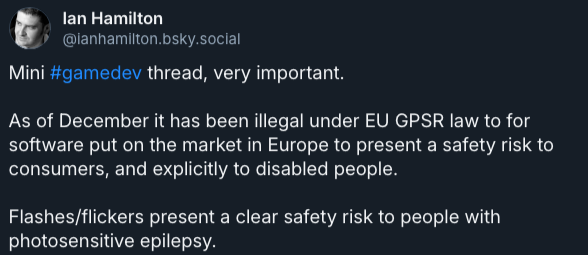
Credit: Ian Hamilton via Bluesky
Anything else we need to take care of, outside of our game being compliant?
Yes. There some additional obligations to assign, with the help of legal counsel and your leadership team:
- Keep a record of your efforts towards EAA compliance.
- Train your staff to understand what they need to implement in their work to ensure everyone works towards EAA compliance.
- Make sure your websites and apps used to provide the applicable service(s) are accessible using POUR principles and EN 301 549 standards.
- Make sure that any public official accessibility information and support services (help desks, support center, health and safety, terms, legal, use, warnings, disclaimers, accessibility, etc.) is accessible using POUR principles and EN 301 549 standards. Having a clear, detailed, and easily findable Accessibility Statement on your website is also best practice. Your support services must have accessible modes of communications as well (i.e. customer service only via phone line or via an inaccessible website does not suffice).
- EAA conformity information is made available to national authorities upon request.
- Put processes in place to ensure compliance is maintained over the lifetime of your products and services.
- Procurement: If your company uses third-party tools, platforms, or services (e.g., analytics providers, payment processors, game engines, middleware), ensure they are also on board with accessibility or that you understand how their limitations might affect your compliance. The EAA encourages public procurement to consider accessibility. Inclusions from third parties are your legal responsibility, unless you have no control over them and don’t have any financial relationship with them.
- App Store/Platform Guidelines: Beyond the EAA, major platform holders (e.g., Apple App Store, Google Play Store, console manufacturers) often have their own accessibility guidelines and may highlight accessibility features in their stores, making it a competitive advantage.
To summarize, your game likely will need to comply with relevant EAA requirements if:
- Your game (any platform) includes text/voice/video chat AND/OR it is a web or mobile game that includes e-commerce;
AND
- If you have communications services: your game (any platform) will include text/voice/video chat after June 28th 2025
AND
- If your game is mobile or web, the game is still receiving updates after June 28th 2025
AND
- Your company/studio employs more than 10 staff OR has over 2M (EUROS) in turnover or balance sheet annually.
Also bear in mind that non-game chat/e-commerce services fall within EAA too, like a VoIP support channel, or a website selling your games.
Again, make sure to seek legal counsel to ensure you’re taking the proper steps to comply and/or confirm whether your game and related products/services are required to comply.
Need some support?
To improve accessibility in your gaming products, you can always reach out to our Advancing Accessibility team at [email protected] and we will be happy to support you with our innovative suite of consultancy, research and testing services.
Article Credits: Améliane Chiasson (Accessibility Lead, Player Research) and Ian Hamilton (Accessibility Specialist, Independent)
Resources:
Related posts
Can game dev teams make better use of player data?
A preview of Seb's player data focused roundtables at GDC 2025

Sebastian Long BSc